Starting in 2025, Veeva Systems is removing its CRM product from the Salesforce platform, offering it as a new product on the Veeva Cloud. This means existing Veeva CRM customers have two options:
- Stay with Veeva and migrate to a brand new CRM platform on Veeva Systems
- Move to Salesforce Life Sciences Cloud and maintain the back-end infrastructure, familiar user interface, and app navigation

Skip a Pros and Cons List and Focus on Priorities
Veeva CRM on Salesforce uses native Salesforce platform functionality with pre-packaged configurations. Customers who decide to stay with Veeva are looking at rolling out a brand new system — creating data models, defining processes, and establishing roles. There are many unknowns around what can be replicated identically, what could be close but not exact, and what might not fit the new Veeva CRM platform at all.
Ask yourself: how critical are these configurations and customizations in your day-to-day operations?
Migrating to Salesforce some of the unknowns
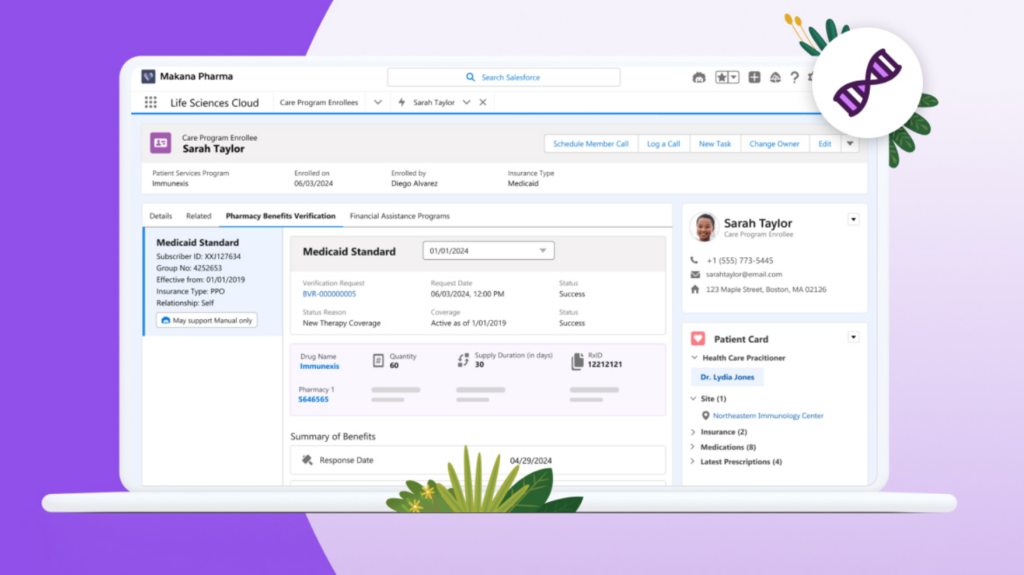
Sample: Salesforce Life Sciences Cloud
Moving to Salesforce Life Sciences Cloud gives you the chance to migrate and upgrade instead of starting from scratch. We can compare an existing Salesforce instance to a brand new one — replicating data models, processes, and automations while replacing some customizations with new, native Salesforce functionality. Similarities across the user interface, back-end management, and platform administration will keep user adoption high.
The biggest consideration is your data. Data migration is a huge undertaking, but moving from Veeva CRM on the Salesforce Platform to Life Sciences Cloud comes with unique tools to make the process easier. Here’s how we approach it:
- Org Assessment using your existing Veeva CRM application as a blueprint
- Build on Life Sciences Cloud and make customizations to the data model
- Configure, Iterate, and Test changes to metadata and updated automations
- Re-Establish Integrations to third-party applications and data sources
- Data Migration and Mapping of objects, fields, records, and files
- User Acceptance Testing and system sign-off
- Soft Launch to gather feedback and troubleshoot
- Cutover and Go-Live
Contact us to learn more about our data migration capabilities and how we can help implement Life Sciences Cloud.